Many of the people we’ve talked to — including physicians and healthcare professionals — had no idea they could carry their own health records on their iPhone. They might check a provider portal or email, but few know that Apple’s Health app can securely store and display your health information in one place. From lab results to medications and immunizations, this feature puts your medical data right in your pocket — no portals, passwords, or printed records to juggle.
Step-by-step: How to download your health records to the Health App
Apple supports securely downloading health records — like allergies, conditions, labs, medications, and vaccinations — from participating healthcare organizations directly into the Health app. Here’s how to get started:
- Open the Health app on your iPhone.
- Tap Summary, then tap your profile picture or initials in the top right.
- Tap Health Records.
- If this is your first time, tap Get Started.
- Choose your healthcare provider or organization from the list (or use a QR code/link provided by your provider).
- Sign in to your provider’s portal as prompted and authorize the download.
Once set up, the app can automatically download new records from that provider as they become available.
Apple Support: https://support.apple.com/en-in/guide/iphone/iphc30019594
How to view your health records in Apple Health
After you’ve added one or more accounts, viewing your records is easy:
- Open the Health app on your iPhone.
- Tap Browse (or use the search icon).
- Scroll down to Health Records.
- Tap a category like Allergies, Lab Results, Medications, Immunizations, etc.
- Tap any item to see details, dates, results, and more.
You can also search for specific types of records (e.g., “lab” or “blood”) using the search field.
Apple Support: https://support.apple.com/guide/iphone/view-health-records-iph2b3a37ddd/ios
Tips for success
- Not all providers support the Health Records feature yet — if you don’t see your provider listed, check with them about their support for Apple’s Health Records features.
- Make sure your iPhone is updated to the latest version of iOS for the best compatibility and security.
- Your medical records in the Health app are encrypted and protected by your iPhone passcode, Face ID, or Touch ID.
Bonus: How to enable Apple Health data in the Theta Wellness App
If you use the Theta Wellness app and want it to access your Apple Health data — including your health records information — here’s how to enable it:
- Open the Theta Wellness in the list of apps, or download it here.
- Go to Me – Linked data sources to add Clinical records from Apple, allow all categories and turn on automatically Share
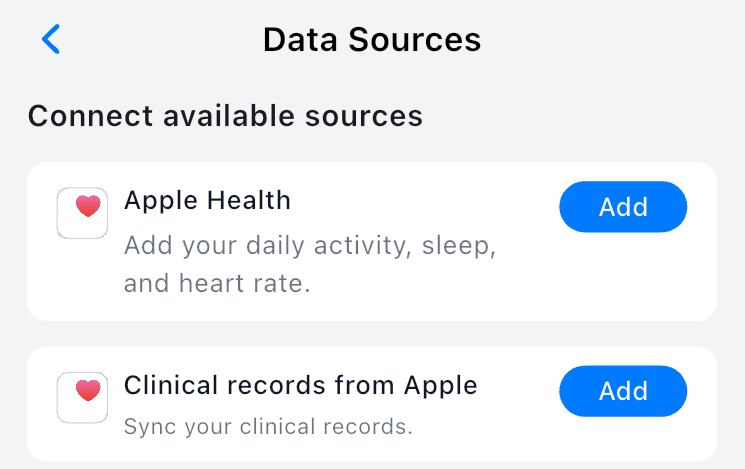
Once allowed, Theta Wellness can combine AI with your personal health context in medical records, along with other connected data sources, making your interactions with AI more personalized and insightful — all while keeping your data secure.
 Theta Wellness health blog