Syncing your Abbott Freestyle Libre glucose data with Theta Wellness is simple and requires downloading four essential apps. These apps work together to seamlessly integrate and manage your glucose readings:
These are used for:
- FreeStyle LibreLink: The official Abbott app for capturing glucose data directly from the Freestyle Libre sensor.
- FreeStyle LibreLinkUp: A companion app for sharing your glucose data with caregivers and loved ones.
- Diabeto Log: A third-party, paid app designed for displaying and syncing your data within the Apple ecosystem, offering a comprehensive view of your health.
- Theta Wellness: Your holistic wellness AI companion app providing advanced medical guidance to help you manage diabetes and health more effectively.
Step-by-Step Guide to Sync Abbott Freestyle Libre Glucose to Theta Wellness
Step 1: Allow the FreeStyle Libre hardware to receive glucose alarm data from FreeStyle Libre 2 Sensors through Bluetooth.
Step 2: Send a sharing invitation to the LibreLinkUp account.
To share your data with caregivers, follow these steps:
- Open the Navigation Menu. Tap the “three lines” icon in the top-left corner of any screen.
- Tap Share or Connected Apps.
- Tap Connect or Manage in LibreLinkUp.
- Tap Add Connection.
- Enter the connection information (name and email address of the person you want to share your glucose readings with). Tap Add.
Step 3: Share LibreLink data with caregivers.
- After receiving an invitation from FreeStyle LibreLink via email, follow the instructions to create an account and connect:
- Create an account: Enter your country/region, name, email address, and preferred password.
- Verify your account via email and complete the setup.
- Once set up, you will see a notification informing you that the FreeStyle LibreLink user wants to share their glucose readings with you. Tap Accept.
Steps 4: Display and integrate data into the Apple ecosystem.
Note: A valid card must be linked to access the full functionality of the app. A 1-week free trial is available for new users.
Step 5: During the new user setup, open the Apple Health data synchronization mechanism. Authorize Apple Health access and enable syncing by navigating to the Settings > Sync section of the app.
Step 6: Sync and link LibreLinkUp.
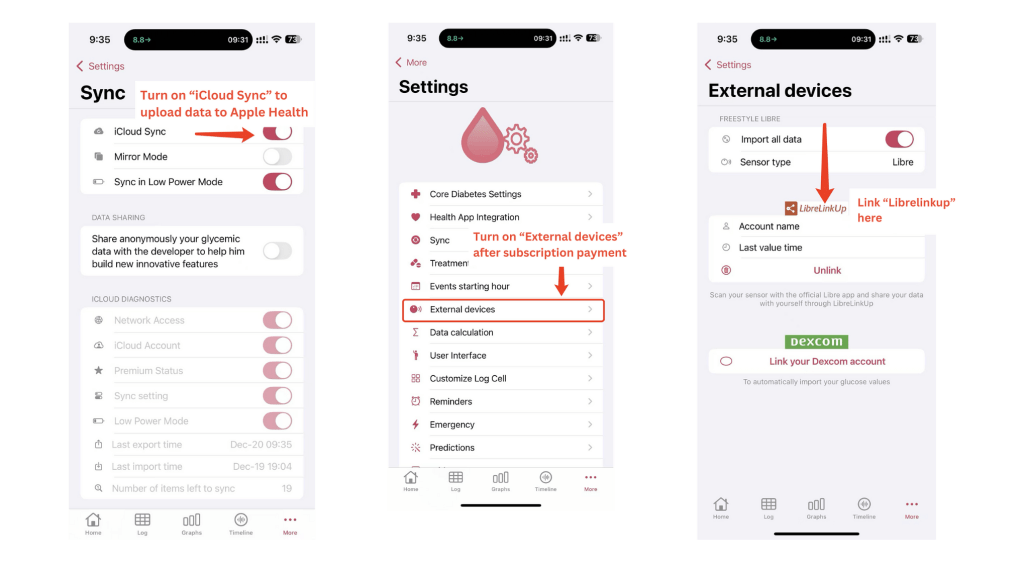
By following these steps, you will be able to collect, share, and integrate your glucose data into the Apple ecosystem seamlessly.
Step 7: Sync your Apple Health data with Theta Health to unlock AI-driven diagnostics and more features.
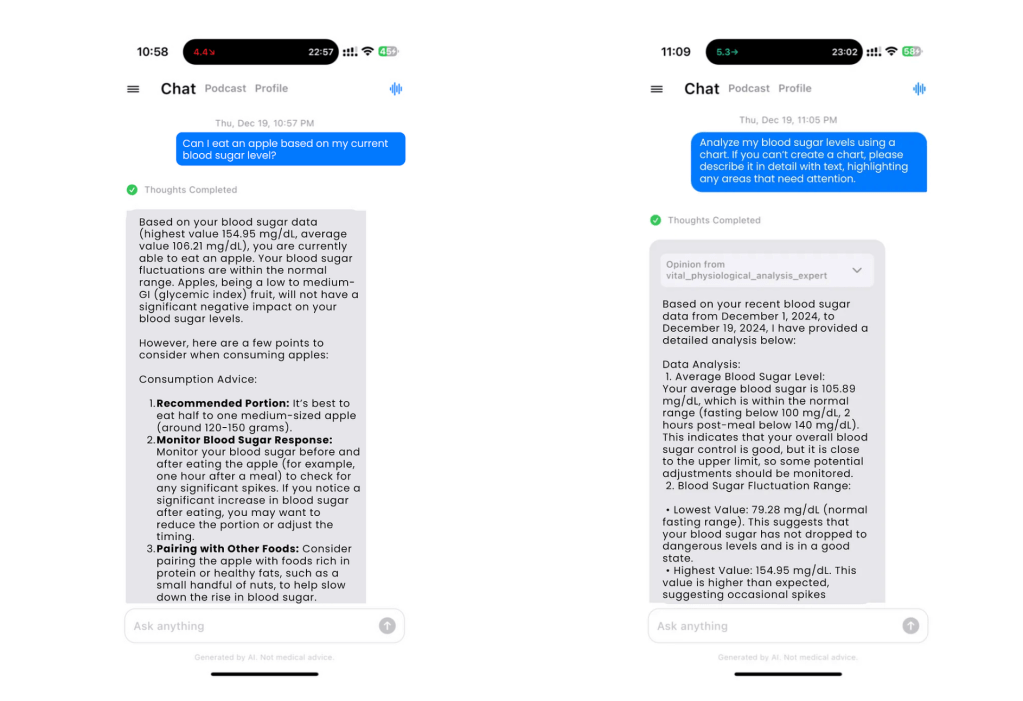
By using these apps together, you can easily monitor and share your glucose data while benefiting from personalized medical insights from Theta Wellness.
 Theta Wellness health blog